Payroll Compliance Hub
The first step toward a unified reporting experience, giving HR teams a faster and more reliable way to manage W-2 filings with confidence.
View project →

About
Resume
Enabled self service document imports and reduced support needs for large migrations
Built a guided validation workflow that gives HR teams a reliable way to review, correct, and submit historical documents without manual back and forth or support intervention.
Lead Product Designer
Project Manager, Dev Lead, QA
4 weeks
Enterprise SaaS for government HRIS document and data management
What’s the problem?
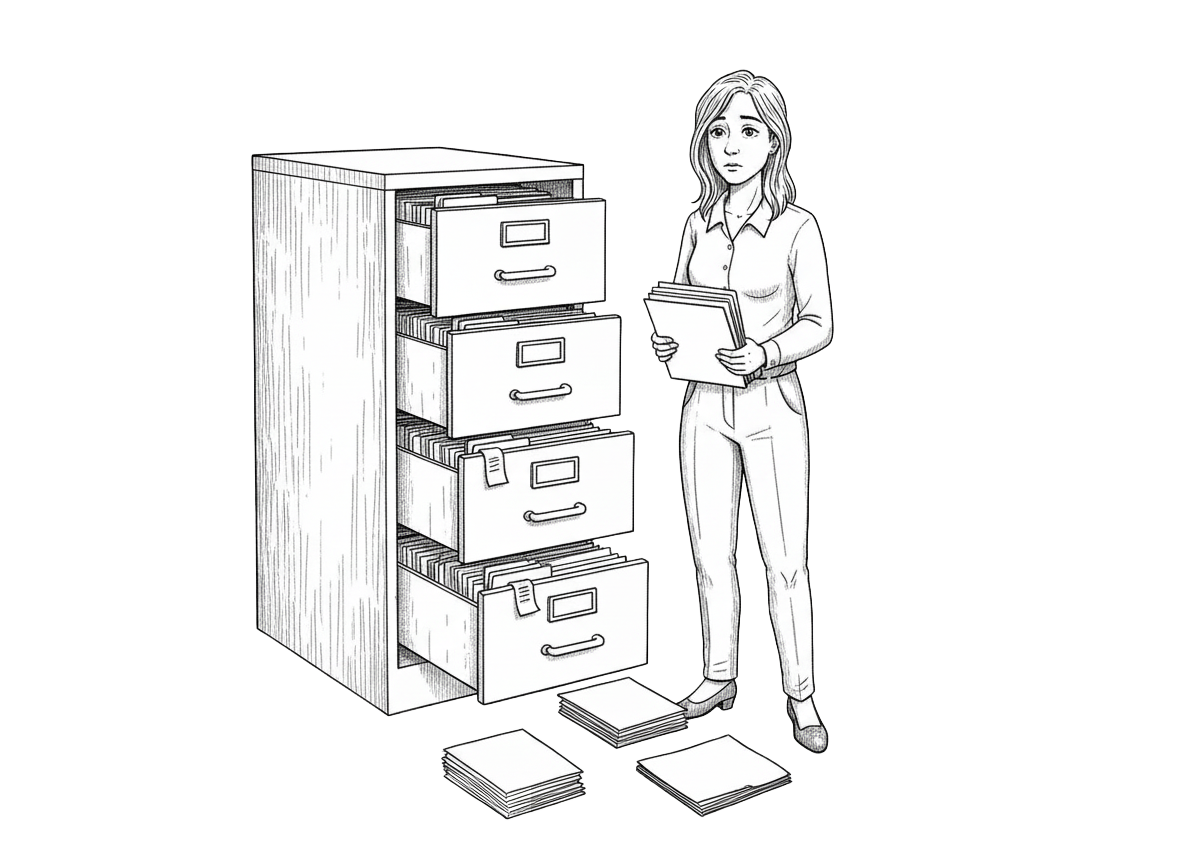
Organizations often store employee documents across shared drives, legacy systems, and physical archives. When moving to NEOGOV, HR teams need a way to migrate these files at scale. Before this project, there was no tool that allowed administrators to preview documents, identify issues, or understand whether their files were ready for import.
Key challenges:
The lack of structure slowed implementations and created confusion for both clients and internal teams.
Users and Needs
Primary User:
HR Administrator
Needs a clear, repeatable process to:
Secondary User:
NEOGOV Implementation or Support
Needs tools to:
Constraints
Research and Insights
The product team completed initial discovery before design began, which provided early context on the types of files clients import and the issues they commonly encounter. To deepen this understanding and ground the workflow in real implementation needs, I met with our internal implementation consultants to learn how document migrations actually unfold during onboarding.
Key insights
These insights shaped a service blueprint that mapped the entire end-to-end workflow for both clients and internal teams. The blueprint highlighted the dependencies, touchpoints, and decision moments that had to be supported in the product. It also served as the foundation for the final user flows, ensuring the experience aligned with real operational practices and created a clear, repeatable path from file upload to import completion.
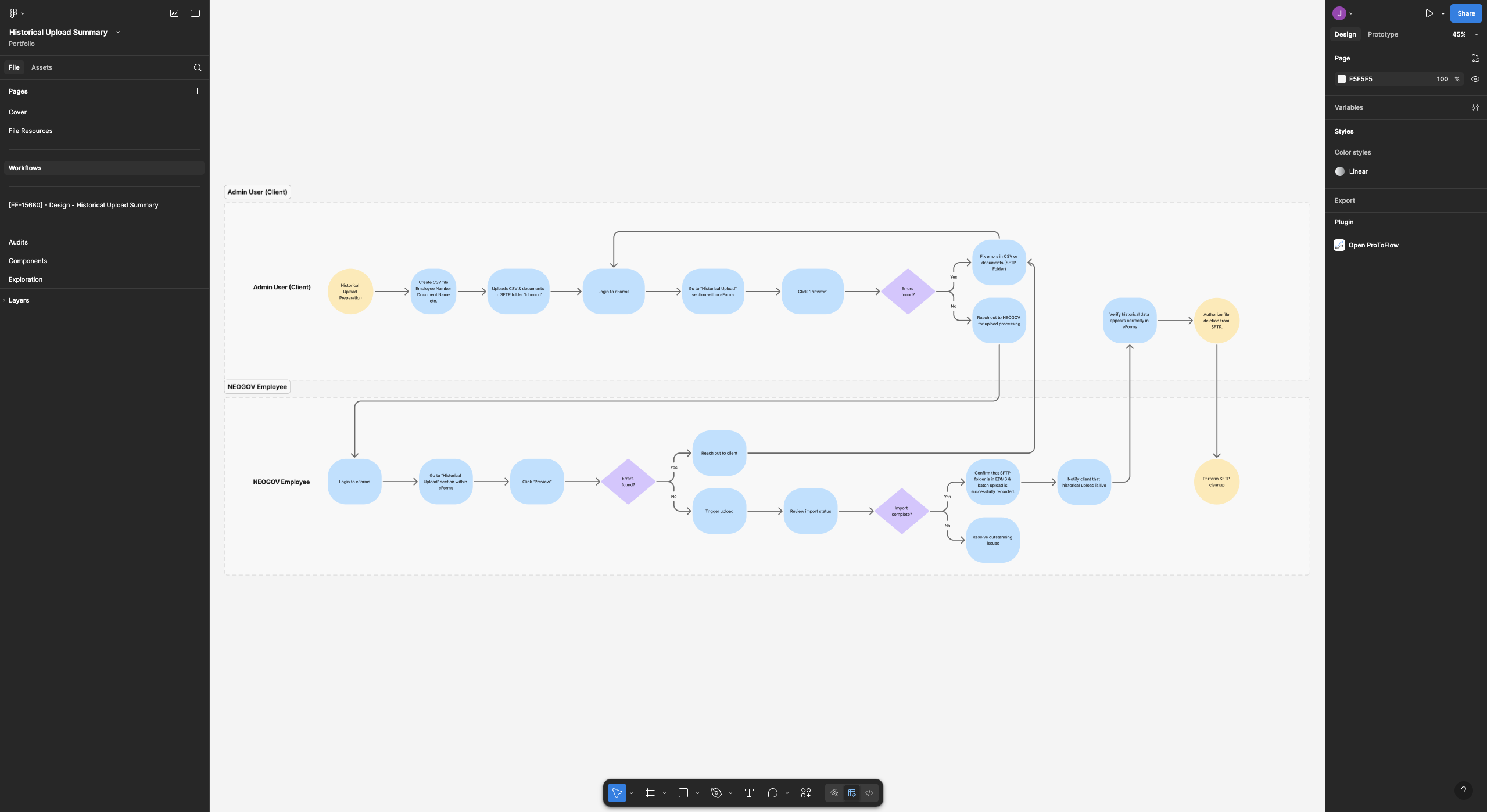
User flow mapping how HR administrators and NEOGOV staff work together across the import process, with swimlanes showing responsibilities and handoffs.

Service blueprint outlining the end-to-end workflow for historical document imports, mapping user actions, system behavior, and support touchpoints.
Solution
The final design introduces a complete document import workflow that guides HR administrators from file preparation through final approval in a clear, structured, and supportive experience. Instead of relying on scattered tools or internal back-and-forth, admins can now review files, validate data, resolve issues, and resubmit updated batches all within a single workspace.
Key improvements include real-time validation results, grouped error summaries, and clear next steps that help users understand what needs to be fixed and why. The workflow supports iterative correction with revalidation, gives visibility into system and internal review stages, and removes uncertainty around import status.
By providing a guided process, actionable feedback, and transparency across each stage, the new experience increases accuracy, reduces support dependency, and gives HR teams the confidence to complete complex imports with far less friction.
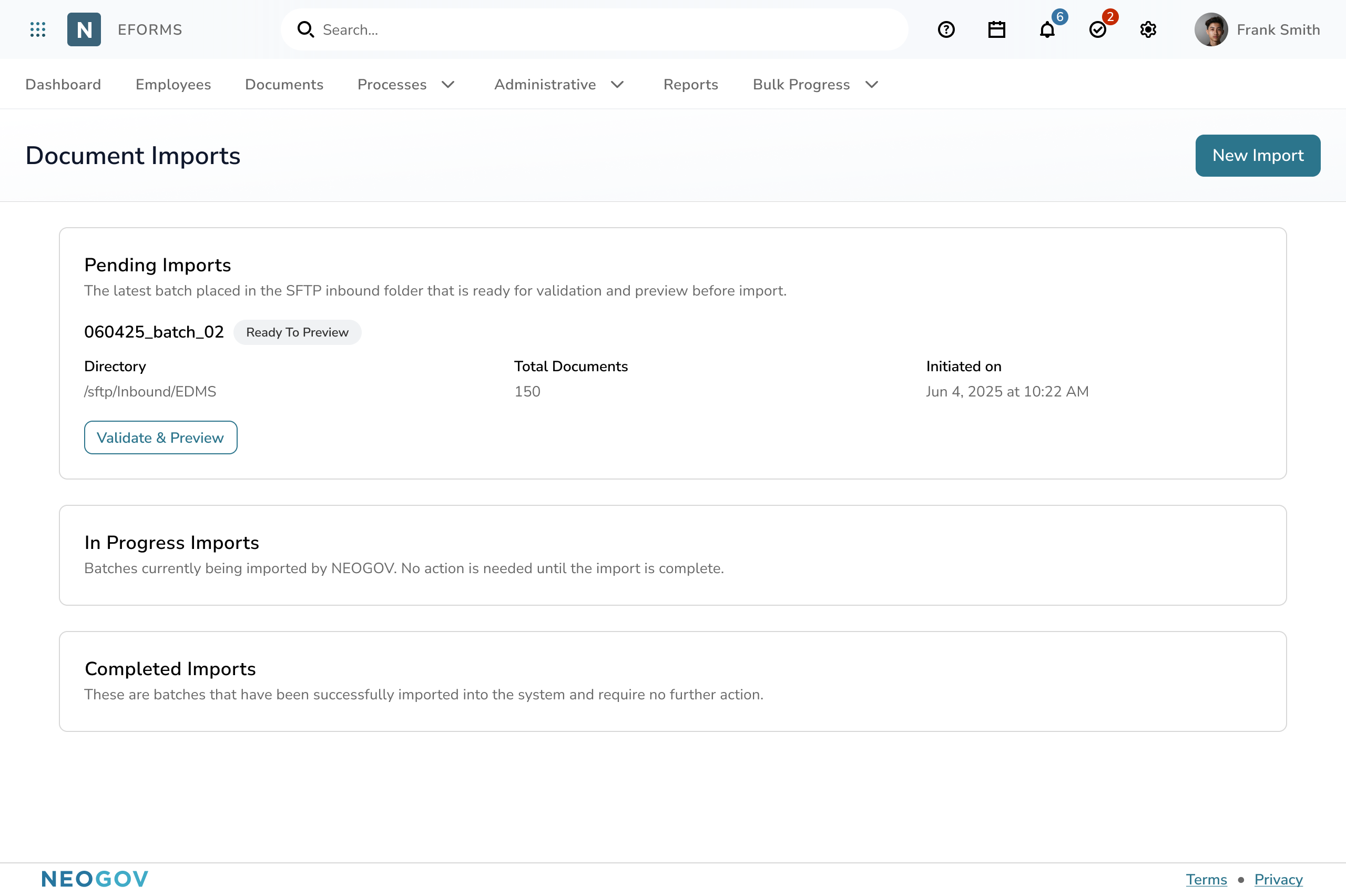
HR administrators and implementation consultants needed one place to view all incoming document batches, understand their status, and know exactly what action to take next. Before this feature, file uploads happened behind the scenes with little visibility, causing confusion, delays, and unnecessary back-and-forth between teams.
The new import dashboard provides a structured, intuitive entry point into the document import workflow. Pending, in-progress, and completed batches are clearly separated, and each batch includes essential context like file count, initiated date, and directory source. Clear calls to action like Validate and Preview guide users toward their next step, improving confidence and reducing guesswork during large or complex migrations.
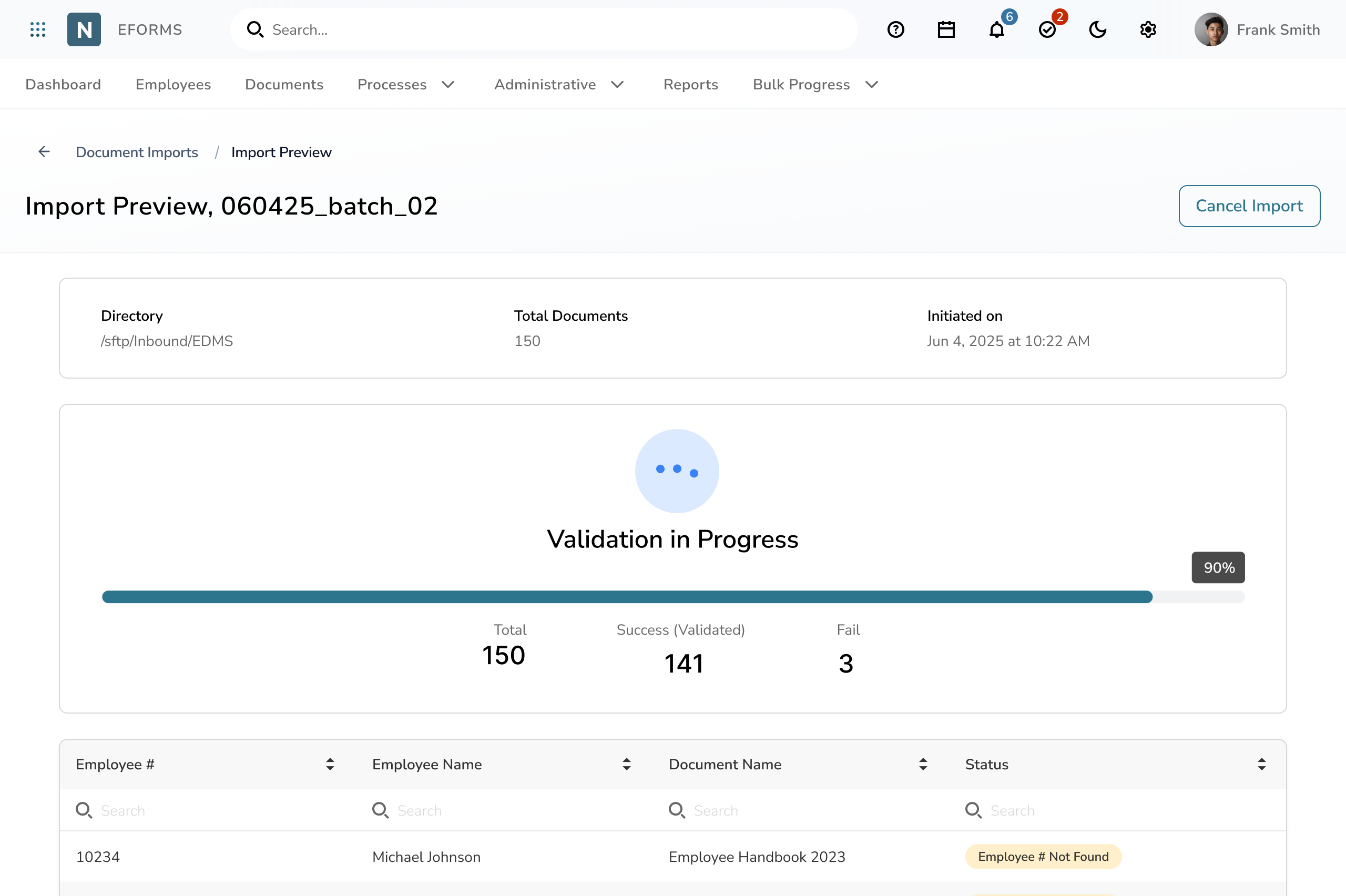
HR administrators often upload hundreds or thousands of historical employee documents at once. Before this project, there was no way to know whether files were valid, which ones had issues, or how far along the system was in processing them. Teams were left guessing, manually reviewing folders, or relying on support for updates.
The new validation screen introduces a clear, real-time view of progress. As the system checks each file, administrators immediately see totals, successes, and failures update live. A progress bar, batch metadata, and inline status indicators help users understand what’s happening without leaving the page. This transparency reduces uncertainty, shortens feedback loops, and gives teams the information they need to move confidently into error resolution.
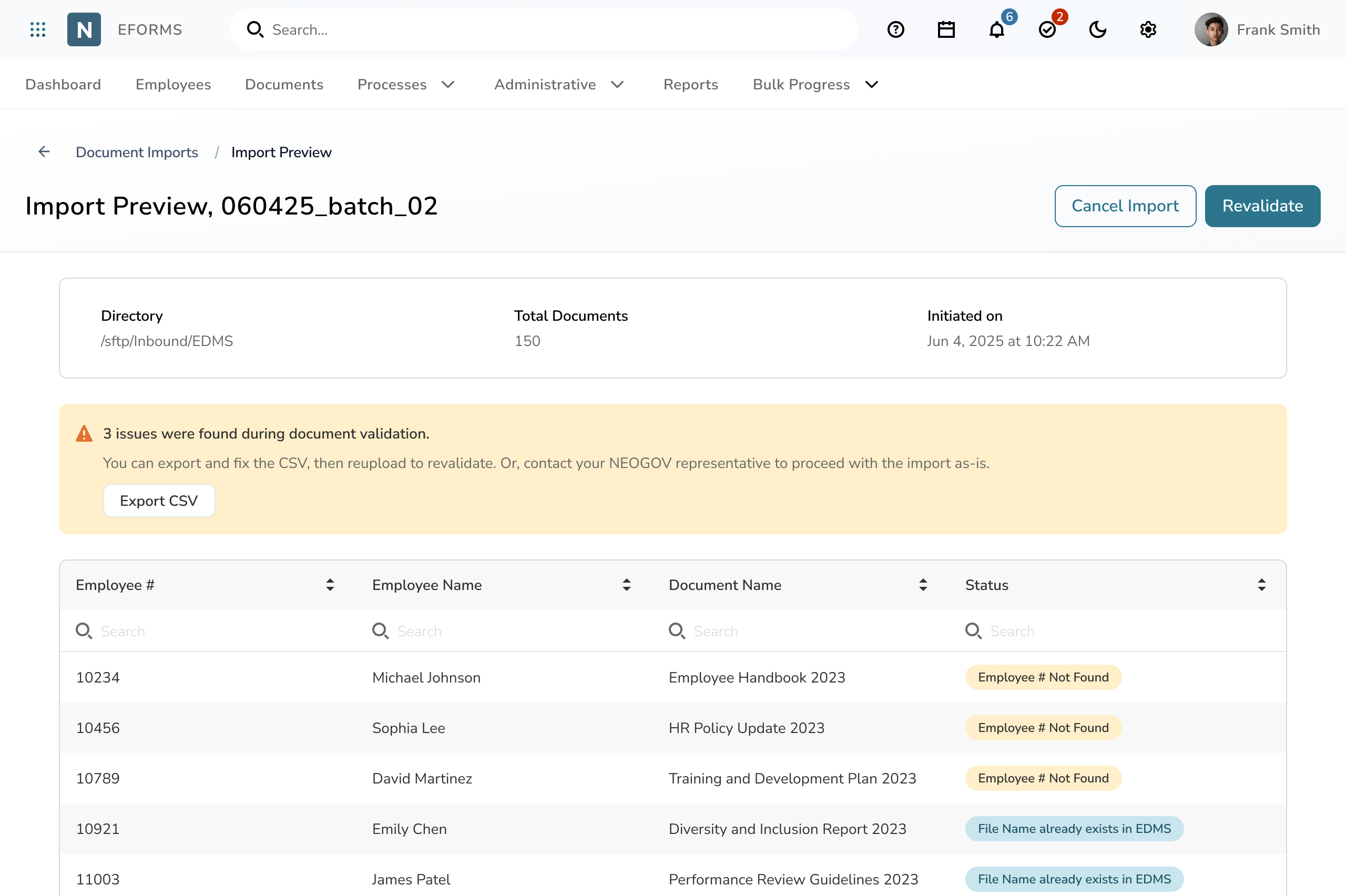
Once validation is complete, administrators need a straightforward way to understand what went wrong, identify which records require correction, and decide how to proceed. Previously, this work happened through spreadsheets and support calls, which made it difficult to pinpoint specific issues or know what to fix.
The preview screen provides an organized summary of all detected issues, along with clear actions for next steps. Users can export problem records for offline correction, review individual errors directly in the table, and quickly reupload and revalidate once fixes are made. This focused, actionable view helps administrators resolve issues with confidence and reduces unnecessary back and forth with support.
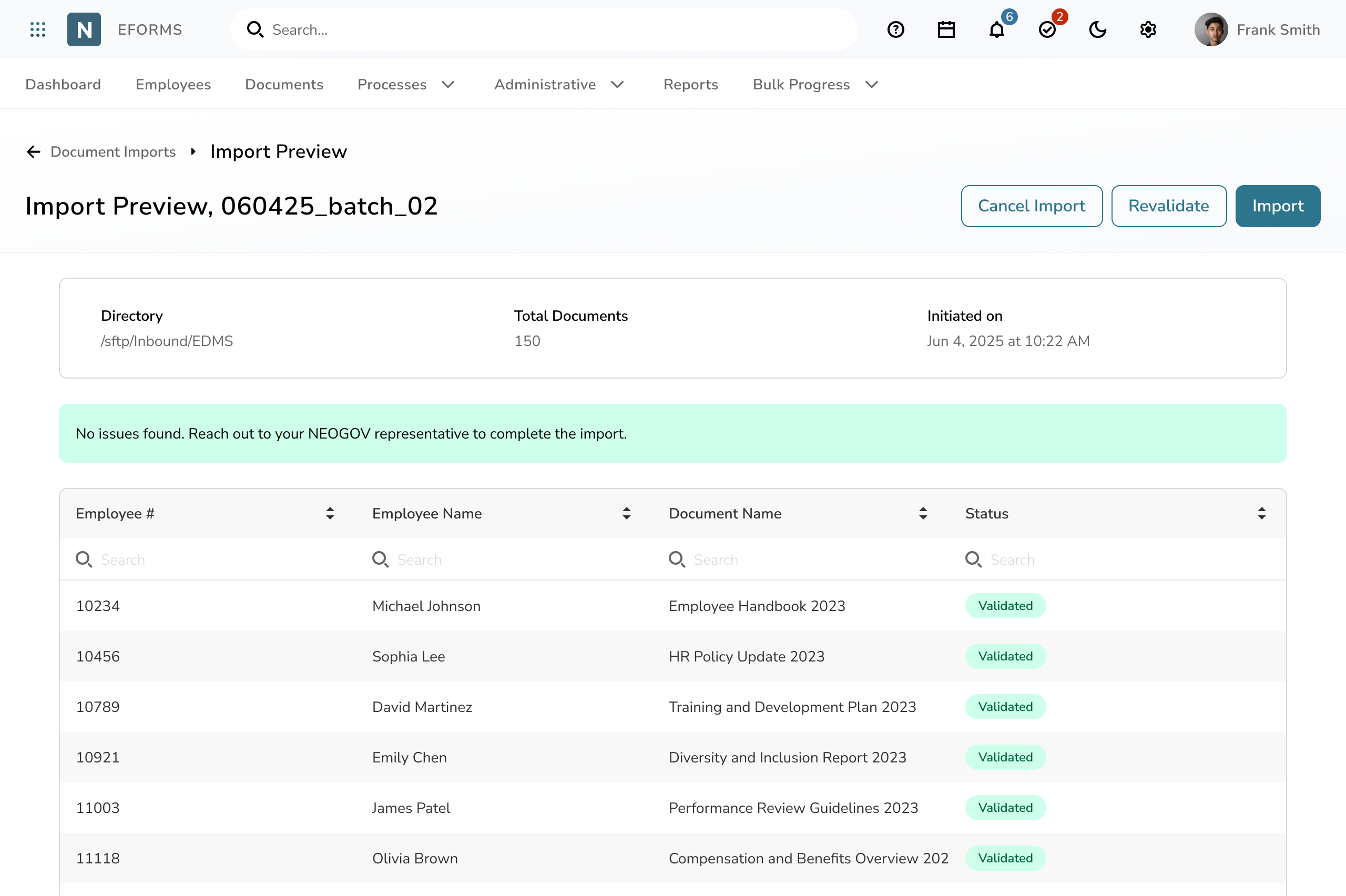
Administrators need reassurance that their uploaded files meet all validation requirements before moving forward. Without explicit confirmation, users may second-guess the results or contact support unnecessarily.
This view provides a clear, positive confirmation that no issues were detected during validation. A prominent success banner, complete document summary, and a fully validated table help users trust the results and confidently proceed to the next step with their NEOGOV representative.
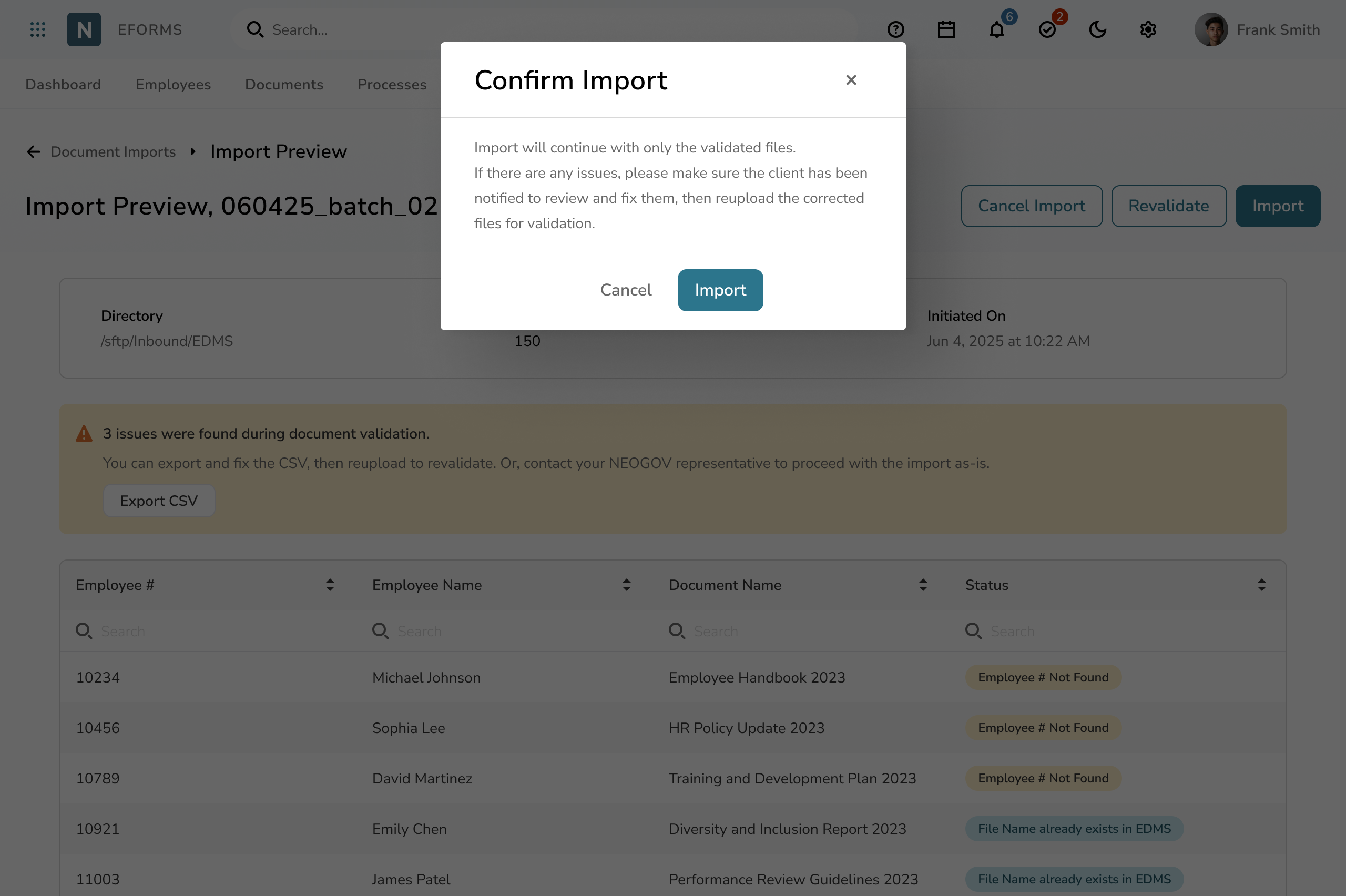
Before completing an import, NEOGOV team members need a clear checkpoint to verify that only validated files will be included. Without a safeguard, there’s a risk of unintentionally importing incomplete or incorrect data.
A concise confirmation modal gives reviewers one last moment to verify the batch, understand what will be included or excluded, and proceed with confidence. By surfacing clear guidance and offering a safe exit, this step helps prevent accidental imports and ensures teams stay aligned on what’s being submitted.
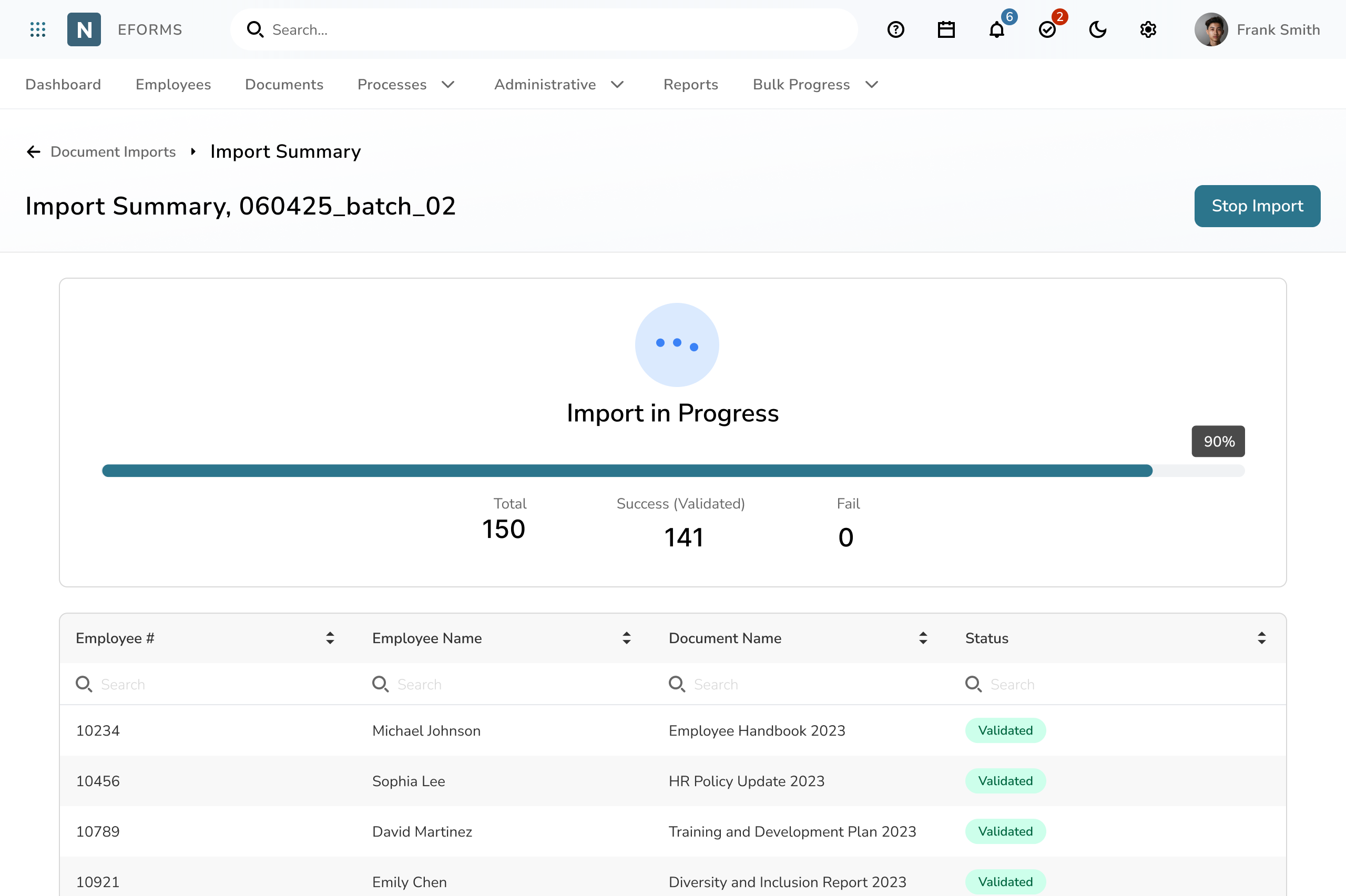
After submitting a batch for import, administrators need a clear sense of what the system is doing. Without visibility, it’s easy to feel unsure about whether files are processing correctly or if any action is required.
The import progress view introduces a transparent, real-time status experience from the moment the batch begins processing. A progress bar, live counters for successful and failed files, and an animated activity indicator help users understand exactly where the batch stands. This gives administrators confidence, reduces uncertainty, and supports smoother coordination with internal teams.
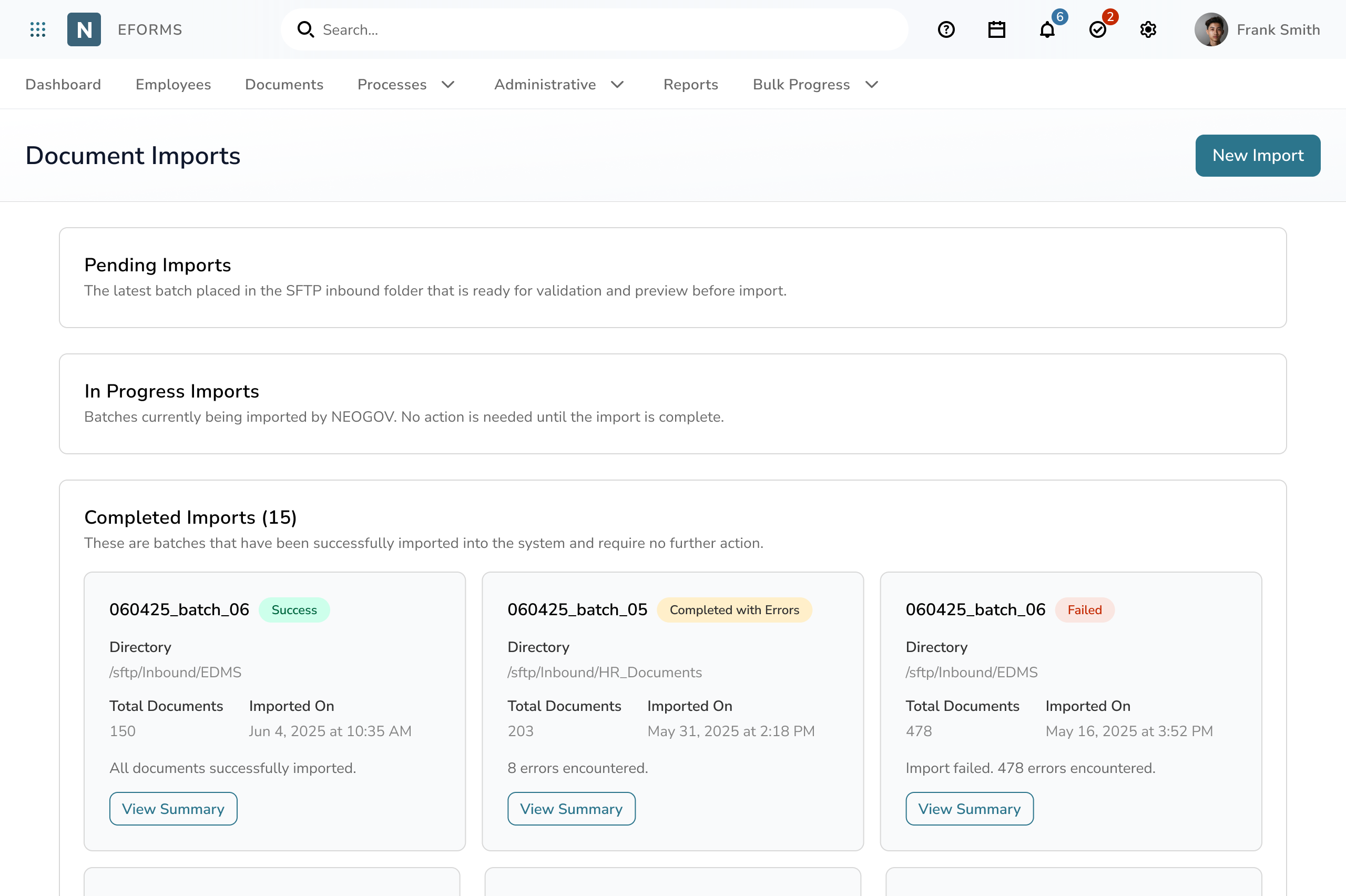
Once a document batch has finished importing, administrators need an easy way to review what was completed, whether any errors occurred, and when the work was finalized. Without a structured history, teams can lose track of past imports or struggle to reference details during audits or support conversations.
The completed imports section organizes every finalized batch into clean, scannable cards that surface key details at a glance. Each card highlights the batch name, total documents, completion date, directory source, and outcome status, with indicators for success, partial errors, or failures. A dedicated summary action gives users quick access to full results when needed. This design supports audit readiness, reduces back-and-forth with support, and gives teams a reliable historical record of all imports.
Impact
The redesigned historical document import workflow gave HR teams the ability to validate, correct, and submit large document batches independently, removing a major source of friction during onboarding and data migrations. By shifting validation and issue resolution into a guided self-service experience, agencies were able to complete imports with far less uncertainty and reliance on support.
Internally, the workflow reduced manual review and back-and-forth for implementation consultants, creating a clearer, more predictable migration process across CSV and SFTP uploads. The design became a reference pattern for future data-ingestion and validation workflows within NEOGOV, influencing how the team approaches transparency, progress feedback, and error handling in other complex admin experiences.
Other Projects 👇
The first step toward a unified reporting experience, giving HR teams a faster and more reliable way to manage W-2 filings with confidence.
View project →
A redesigned workflow that gives HR teams a faster, more transparent way to manage grades and steps.
View project →
Home
About
Resume
Enabled self service document imports and reduced support needs for large migrations
Built a guided validation workflow that gives HR teams a reliable way to review, correct, and submit historical documents without manual back and forth or support intervention.
Lead Product Designer
Project Manager, Dev Lead, QA
4 weeks
Enterprise SaaS for government HRIS document and data management
What’s the problem?
Organizations often store employee documents across shared drives, legacy systems, and physical archives. When moving to NEOGOV, HR teams need a way to migrate these files at scale. Before this project, there was no tool that allowed administrators to preview documents, identify issues, or understand whether their files were ready for import.
Key challenges:
The lack of structure slowed implementations and created confusion for both clients and internal teams.
Users and Needs
Primary User:
HR Administrator
Needs a clear, repeatable process to:
Secondary User:
NEOGOV Implementation or Support
Needs tools to:
Constraints
Research and Insights
The product team completed initial discovery before design began, which provided early context on the types of files clients import and the issues they commonly encounter. To deepen this understanding and ground the workflow in real implementation needs, I met with our internal implementation consultants to learn how document migrations actually unfold during onboarding.
Key insights
These insights shaped a service blueprint that mapped the entire end-to-end workflow for both clients and internal teams. The blueprint highlighted the dependencies, touchpoints, and decision moments that had to be supported in the product. It also served as the foundation for the final user flows, ensuring the experience aligned with real operational practices and created a clear, repeatable path from file upload to import completion.
User flow mapping how HR administrators and NEOGOV staff work together across the import process, with swimlanes showing responsibilities and handoffs.
Service blueprint outlining the end-to-end workflow for historical document imports, mapping user actions, system behavior, and support touchpoints.
Solution
The final design introduces a complete document import workflow that guides HR administrators from file preparation through final approval in a clear, structured, and supportive experience. Instead of relying on scattered tools or internal back-and-forth, admins can now review files, validate data, resolve issues, and resubmit updated batches all within a single workspace.
Key improvements include real-time validation results, grouped error summaries, and clear next steps that help users understand what needs to be fixed and why. The workflow supports iterative correction with revalidation, gives visibility into system and internal review stages, and removes uncertainty around import status.
By providing a guided process, actionable feedback, and transparency across each stage, the new experience increases accuracy, reduces support dependency, and gives HR teams the confidence to complete complex imports with far less friction.
HR administrators and implementation consultants needed one place to view all incoming document batches, understand their status, and know exactly what action to take next. Before this feature, file uploads happened behind the scenes with little visibility, causing confusion, delays, and unnecessary back-and-forth between teams.
The new import dashboard provides a structured, intuitive entry point into the document import workflow. Pending, in-progress, and completed batches are clearly separated, and each batch includes essential context like file count, initiated date, and directory source. Clear calls to action like Validate and Preview guide users toward their next step, improving confidence and reducing guesswork during large or complex migrations.
HR administrators often upload hundreds or thousands of historical employee documents at once. Before this project, there was no way to know whether files were valid, which ones had issues, or how far along the system was in processing them. Teams were left guessing, manually reviewing folders, or relying on support for updates.
The new validation screen introduces a clear, real-time view of progress. As the system checks each file, administrators immediately see totals, successes, and failures update live. A progress bar, batch metadata, and inline status indicators help users understand what’s happening without leaving the page. This transparency reduces uncertainty, shortens feedback loops, and gives teams the information they need to move confidently into error resolution.
Once validation is complete, administrators need a straightforward way to understand what went wrong, identify which records require correction, and decide how to proceed. Previously, this work happened through spreadsheets and support calls, which made it difficult to pinpoint specific issues or know what to fix.
The preview screen provides an organized summary of all detected issues, along with clear actions for next steps. Users can export problem records for offline correction, review individual errors directly in the table, and quickly reupload and revalidate once fixes are made. This focused, actionable view helps administrators resolve issues with confidence and reduces unnecessary back and forth with support.
Administrators need reassurance that their uploaded files meet all validation requirements before moving forward. Without explicit confirmation, users may second-guess the results or contact support unnecessarily.
This view provides a clear, positive confirmation that no issues were detected during validation. A prominent success banner, complete document summary, and a fully validated table help users trust the results and confidently proceed to the next step with their NEOGOV representative.
Before completing an import, NEOGOV team members need a clear checkpoint to verify that only validated files will be included. Without a safeguard, there’s a risk of unintentionally importing incomplete or incorrect data.
A concise confirmation modal gives reviewers one last moment to verify the batch, understand what will be included or excluded, and proceed with confidence. By surfacing clear guidance and offering a safe exit, this step helps prevent accidental imports and ensures teams stay aligned on what’s being submitted.
After submitting a batch for import, administrators need a clear sense of what the system is doing. Without visibility, it’s easy to feel unsure about whether files are processing correctly or if any action is required.
The import progress view introduces a transparent, real-time status experience from the moment the batch begins processing. A progress bar, live counters for successful and failed files, and an animated activity indicator help users understand exactly where the batch stands. This gives administrators confidence, reduces uncertainty, and supports smoother coordination with internal teams.
Once a document batch has finished importing, administrators need an easy way to review what was completed, whether any errors occurred, and when the work was finalized. Without a structured history, teams can lose track of past imports or struggle to reference details during audits or support conversations.
The completed imports section organizes every finalized batch into clean, scannable cards that surface key details at a glance. Each card highlights the batch name, total documents, completion date, directory source, and outcome status, with indicators for success, partial errors, or failures. A dedicated summary action gives users quick access to full results when needed. This design supports audit readiness, reduces back-and-forth with support, and gives teams a reliable historical record of all imports.
Impact
The redesigned historical document import workflow gave HR teams the ability to validate, correct, and submit large document batches independently, removing a major source of friction during onboarding and data migrations. By shifting validation and issue resolution into a guided self-service experience, agencies were able to complete imports with far less uncertainty and reliance on support.
Internally, the workflow reduced manual review and back-and-forth for implementation consultants, creating a clearer, more predictable migration process across CSV and SFTP uploads. The design became a reference pattern for future data-ingestion and validation workflows within NEOGOV, influencing how the team approaches transparency, progress feedback, and error handling in other complex admin experiences.
Other Projects 👇
The first step toward a unified reporting experience, giving HR teams a faster and more reliable way to manage W-2 filings with confidence.
View project →
A redesigned workflow that gives HR teams a faster, more transparent way to manage grades and steps.
View project →
Home
About
Resume
Enabled self service document imports and reduced support needs for large migrations
Built a guided validation workflow that gives HR teams a reliable way to review, correct, and submit historical documents without manual back and forth or support intervention.
Lead Product Designer
Project Manager, Dev Lead, QA
4 weeks
Enterprise SaaS for government HRIS document and data management
What’s the problem?
Organizations often store employee documents across shared drives, legacy systems, and physical archives. When moving to NEOGOV, HR teams need a way to migrate these files at scale. Before this project, there was no tool that allowed administrators to preview documents, identify issues, or understand whether their files were ready for import.
Key challenges:
The lack of structure slowed implementations and created confusion for both clients and internal teams.
Users and Needs
Primary User:
HR Administrator
Needs a clear, repeatable process to:
Secondary User:
NEOGOV Implementation or Support
Needs tools to:
Constraints
Research and Insights
The product team completed initial discovery before design began, which provided early context on the types of files clients import and the issues they commonly encounter. To deepen this understanding and ground the workflow in real implementation needs, I met with our internal implementation consultants to learn how document migrations actually unfold during onboarding.
Key insights
These insights shaped a service blueprint that mapped the entire end-to-end workflow for both clients and internal teams. The blueprint highlighted the dependencies, touchpoints, and decision moments that had to be supported in the product. It also served as the foundation for the final user flows, ensuring the experience aligned with real operational practices and created a clear, repeatable path from file upload to import completion.
User flow mapping how HR administrators and NEOGOV staff work together across the import process, with swimlanes showing responsibilities and handoffs.
Service blueprint outlining the end-to-end workflow for historical document imports, mapping user actions, system behavior, and support touchpoints.
Solution
The final design introduces a complete document import workflow that guides HR administrators from file preparation through final approval in a clear, structured, and supportive experience. Instead of relying on scattered tools or internal back-and-forth, admins can now review files, validate data, resolve issues, and resubmit updated batches all within a single workspace.
Key improvements include real-time validation results, grouped error summaries, and clear next steps that help users understand what needs to be fixed and why. The workflow supports iterative correction with revalidation, gives visibility into system and internal review stages, and removes uncertainty around import status.
By providing a guided process, actionable feedback, and transparency across each stage, the new experience increases accuracy, reduces support dependency, and gives HR teams the confidence to complete complex imports with far less friction.
HR administrators and implementation consultants needed one place to view all incoming document batches, understand their status, and know exactly what action to take next. Before this feature, file uploads happened behind the scenes with little visibility, causing confusion, delays, and unnecessary back-and-forth between teams.
The new import dashboard provides a structured, intuitive entry point into the document import workflow. Pending, in-progress, and completed batches are clearly separated, and each batch includes essential context like file count, initiated date, and directory source. Clear calls to action like Validate and Preview guide users toward their next step, improving confidence and reducing guesswork during large or complex migrations.
HR administrators often upload hundreds or thousands of historical employee documents at once. Before this project, there was no way to know whether files were valid, which ones had issues, or how far along the system was in processing them. Teams were left guessing, manually reviewing folders, or relying on support for updates.
The new validation screen introduces a clear, real-time view of progress. As the system checks each file, administrators immediately see totals, successes, and failures update live. A progress bar, batch metadata, and inline status indicators help users understand what’s happening without leaving the page. This transparency reduces uncertainty, shortens feedback loops, and gives teams the information they need to move confidently into error resolution.
Once validation is complete, administrators need a straightforward way to understand what went wrong, identify which records require correction, and decide how to proceed. Previously, this work happened through spreadsheets and support calls, which made it difficult to pinpoint specific issues or know what to fix.
The preview screen provides an organized summary of all detected issues, along with clear actions for next steps. Users can export problem records for offline correction, review individual errors directly in the table, and quickly reupload and revalidate once fixes are made. This focused, actionable view helps administrators resolve issues with confidence and reduces unnecessary back and forth with support.
Administrators need reassurance that their uploaded files meet all validation requirements before moving forward. Without explicit confirmation, users may second-guess the results or contact support unnecessarily.
This view provides a clear, positive confirmation that no issues were detected during validation. A prominent success banner, complete document summary, and a fully validated table help users trust the results and confidently proceed to the next step with their NEOGOV representative.
Before completing an import, NEOGOV team members need a clear checkpoint to verify that only validated files will be included. Without a safeguard, there’s a risk of unintentionally importing incomplete or incorrect data.
A concise confirmation modal gives reviewers one last moment to verify the batch, understand what will be included or excluded, and proceed with confidence. By surfacing clear guidance and offering a safe exit, this step helps prevent accidental imports and ensures teams stay aligned on what’s being submitted.
After submitting a batch for import, administrators need a clear sense of what the system is doing. Without visibility, it’s easy to feel unsure about whether files are processing correctly or if any action is required.
The import progress view introduces a transparent, real-time status experience from the moment the batch begins processing. A progress bar, live counters for successful and failed files, and an animated activity indicator help users understand exactly where the batch stands. This gives administrators confidence, reduces uncertainty, and supports smoother coordination with internal teams.
Once a document batch has finished importing, administrators need an easy way to review what was completed, whether any errors occurred, and when the work was finalized. Without a structured history, teams can lose track of past imports or struggle to reference details during audits or support conversations.
The completed imports section organizes every finalized batch into clean, scannable cards that surface key details at a glance. Each card highlights the batch name, total documents, completion date, directory source, and outcome status, with indicators for success, partial errors, or failures. A dedicated summary action gives users quick access to full results when needed. This design supports audit readiness, reduces back-and-forth with support, and gives teams a reliable historical record of all imports.
Impact
The redesigned historical document import workflow gave HR teams the ability to validate, correct, and submit large document batches independently, removing a major source of friction during onboarding and data migrations. By shifting validation and issue resolution into a guided self-service experience, agencies were able to complete imports with far less uncertainty and reliance on support.
Internally, the workflow reduced manual review and back-and-forth for implementation consultants, creating a clearer, more predictable migration process across CSV and SFTP uploads. The design became a reference pattern for future data-ingestion and validation workflows within NEOGOV, influencing how the team approaches transparency, progress feedback, and error handling in other complex admin experiences.
Other Projects 👇
The first step toward a unified reporting experience, giving HR teams a faster and more reliable way to manage W-2 filings with confidence.
View project →
A redesigned workflow that gives HR teams a faster, more transparent way to manage grades and steps.
View project →